日常中,经常需要从浏览器中的网页或者从其它 APP 中直接打开我们自己的 APP,这时就需要使用到深度链接技术。
1. Deep Link
Deep Link 本质是通过 URL Schemes 唤起 APP,在代码中监听链接的值并根据需要处理链接中的数据。Deep Link 的配置方式如下:
需要在
AndroidManifest.xml文件中添加配置:<activity android:name=".MainActivity" android:configChanges="keyboardHidden|orientation|screenSize" android:exported="true" android:launchMode="singleTask"> <intent-filter> <action android:name="android.intent.action.VIEW" /> <category android:name="android.intent.category.DEFAULT" /> <category android:name="android.intent.category.BROWSABLE" /> <!-- Accepts URIs that begin with "sofishsdk://app" --> <data android:host="app" android:scheme="sofishsdk" /> </intent-filter> <intent-filter> <action android:name="android.intent.action.VIEW" /> <category android:name="android.intent.category.DEFAULT" /> <category android:name="android.intent.category.BROWSABLE" /> <!-- Accepts URIs that begin with "sofishsdk://sdk.sofish.com/app" --> <data android:host="sdk.sofish.com" android:pathPrefix="/app" android:scheme="sofishsdk" /> <!-- note that the leading "/" is required for pathPrefix--> </intent-filter> </activity>[!TIP|labelVisibility:hidden|iconVisibility:hidden] 在 Android 12 及更高版本上,
scheme为http和https的深度链接会在浏览器中打开,不能正确打开应用。在配置深度链接的
Activity中处理链接中的数据:@Override protected void onCreate(Bundle savedInstanceState) { super.onCreate(savedInstanceState); setContentView(R.layout.activity_game); // 如果App未启动,Deep Link唤起App时触发 handleIntent(getIntent()); } @Override protected void onNewIntent(Intent intent) { super.onNewIntent(intent); // 如果App已经启动,Deep Link唤起App时触发 handleIntent(intent); } private void handleIntent(Intent intent) { Uri data = intent == null ? null : intent.getData(); if (data != null) { // Deep Link链接以此为例:sofishsdk://app?key1=value1&key2=value2 // 完整链接 String url = data.toString(); // scheme: sofishsdk String scheme = data.getScheme(); // host: app String host = data.getHost(); // 获取key1参数值: value1 String value1 = data.getQueryParameter("key1"); // Uri 类的详细介绍请参考官方文档:https://developer.android.com/reference/android/net/Uri } }使用场景示例:H5 端提供链接 > 游戏拼接参数 > 游戏调用 SDK 系统分享 > 分享给其他用户 > 用户点击链接 > 唤起游戏应用 > 游戏监听 DeepLink 系统回调并处理对应数据
2. Android App Links
Android 6.0(API 级别 23)及更高版本上开始支持 App Links,可以通过 scheme 为 http 和 https 的深度链接打开应用。App Links 可以认为是特殊的 Deep Link,只不过它多了一种类似于验证机制,如果验证通过,就设置默认打开,如果验证不过,则降级为 Deep Link,如果单从 APP 端来看,区别主要在 AndroidManifest.xml 文件中的 android:autoVerify="true"。App Links 的配置方式如下:
- 添加意图过滤器:
- Android Studio 提供了创建 Android App Links 的工具,选择
Tools > App Links Assistant,打开Open URL Mapping Editor并点击URL Mapping底部的+,如下图所示: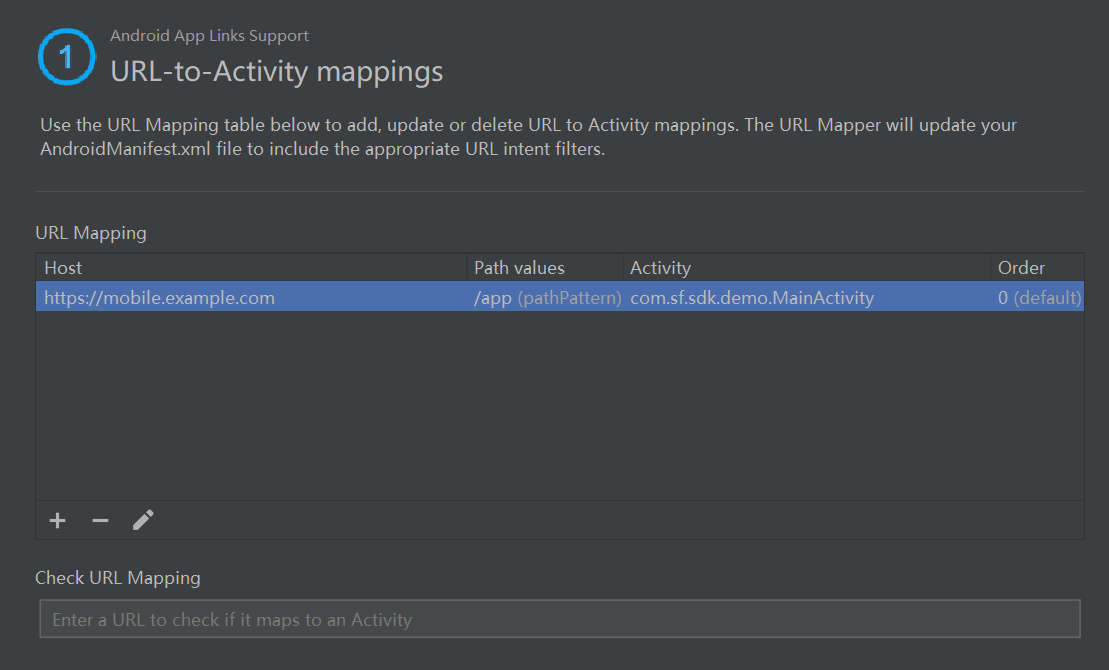
- 在
Add URL Mapping面板中添加新 URL 映射的详细信息,如下图所示: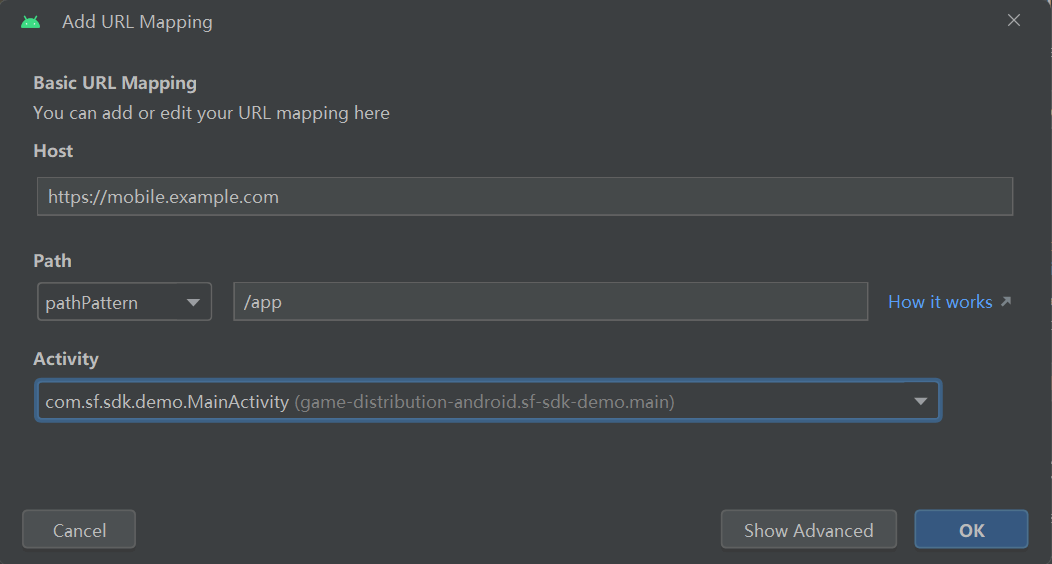
- 填写完成后会在
AndroidManifest.xml文件中生成以下配置:<activity android:name=".MainActivity" android:configChanges="keyboardHidden|orientation|screenSize" android:exported="true" android:launchMode="singleTask"> <intent-filter android:autoVerify="true"> <action android:name="android.intent.action.VIEW" /> <category android:name="android.intent.category.DEFAULT" /> <category android:name="android.intent.category.BROWSABLE" /> <data android:host="mobile.example.com" android:pathPattern="/app" android:scheme="https" /> </intent-filter> </activity>[!TIP|labelVisibility:hidden|iconVisibility:hidden] App Links 的 scheme 仅支持
http和https,不支持自定义的scheme,android:autoVerify="true"建议配置到每一个<intent-filter>以保持一致性。
- Android Studio 提供了创建 Android App Links 的工具,选择
验证 URL 映射是否正常工作,请在
Check URL Mapping输入框中输入 URL ,然后检查映射。如果工作正常,会显示输入的 URL 映射到选择的活动的成功消息。处理传入链接:
- 在
App Links Assistant打开Select Activity,从Select an Activity列表中选择一个Activity,然后单击Insert Code,App Links Assistant会将代码添加到选择的Activity中,如下图所示: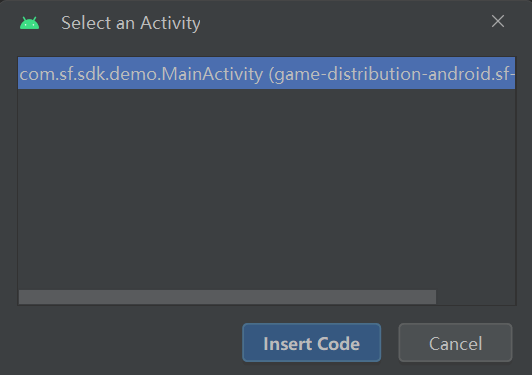
通过这种方式生成的代码并不完整,需要进行完善,示例如下:
@Override
protected void onCreate(Bundle savedInstanceState) {
  super.onCreate(savedInstanceState);
  setContentView(R.layout.activity_game);

  // 如果App未启动,App Links唤起App时触发
  handleIntent(getIntent());
}

@Override
protected void onNewIntent(Intent intent) {
  super.onNewIntent(intent);
  // 如果App已经启动,App Links唤起App时触发
  handleIntent(intent);
}

private void handleIntent(Intent intent) {
  String appLinkAction = intent.getAction();
  Uri appLinkData = intent.getData();
  if (Intent._ACTION_VIEW_.equals(appLinkAction) && appLinkData != null) {
      // 处理 appLinkData
  }
}
- 在
生成数字资产链接文件:
- 在
App Links Assistant打开Open Digital Asset Links File Generator面板; - 输入
Site domain和Application ID; - 如果要在数字资产链接文件中包含对 One Tap sign-in 的支持,请勾选
Support sharing credentials between the app and the website,并填写Sign in URL; - 为应用程序的发布版本指定签名配置或选择密钥库文件;
- 点击
Generate Digital Asset Links file生成文件,如下图所示: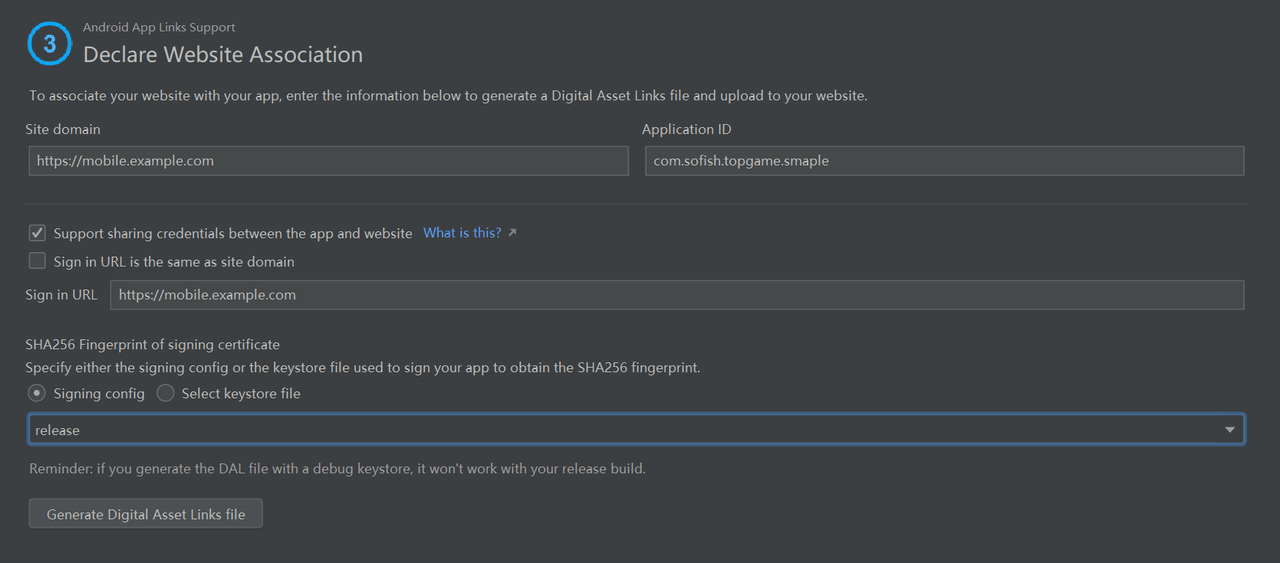
- Android Studio 生成文件后,点击
Save file将assetlinks.json文件保存; - 将
assetlinks.json文件上传到您的网站,每个人都具有读取权限,网址为https://<domain>/.well-known/assetlinks.json;- 点击
Link and Verify确认已经将assetlinks.json文件上传到正确的位置。
- 点击
- 在
- 验证链接是否可以打开正确的
Activity,请按照下列步骤操作:- 在
App Links Assistant打开Test App Links; - 在
URL输入框中输入要测试的 URL,例如https://mobile.example.com/app;[!TIP|labelVisibility:hidden|iconVisibility:hidden] 注意:系统通过加密的
https协议验证数字资产链接文件。确保可以assetlinks.json通过https协议访问该文件,无论应用程序的意图过滤器是否包含https。 - 点击
Run Test进行测试。 - 如果 URL 映射设置不正确或不存在,则
Test App Links对话框中的 URL 下方会显示一条错误消息,否则,Android Studio 将在设备或模拟器中的指定活动中启动应用程序,而不显示应用程序选择对话框,并在App Link Testing对话框中显示成功消息,如下图所示所示: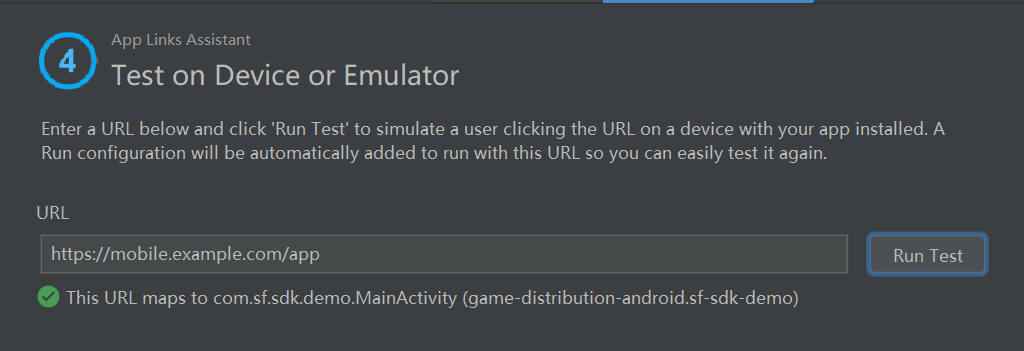
- 在
3. AppsFlyer OneLink
AppsFlyer OneLink 的工作原理如下:用户单击 OneLink 链接时,如果用户安装了应用程序,AppsFlyer OneLink 将打开该应用程序;如果用户没有安装该应用程序,将被重定向到应用程序商店,下载后,用户打开该应用程序。
请按照以下步骤集成 AppsFlyer OneLink:
在
AndroidManifest.xml文件的main activity中添加以下配置:<intent-filter android:autoVerify="true"> <action android:name="android.intent.action.VIEW" /> <category android:name="android.intent.category.DEFAULT" /> <category android:name="android.intent.category.BROWSABLE" /> <data android:host="onelink-basic-app.onelink.me" android:scheme="https" /> </intent-filter>选择 URI 方案,并在
AndroidManifest.xml文件中处理深度链接的activity标签下中添加以下配置:<intent-filter> <action android:name="android.intent.action.VIEW" /> <category android:name="android.intent.category.DEFAULT" /> <category android:name="android.intent.category.BROWSABLE" /> <data android:host="app" android:scheme="sofishsdk" /> </intent-filter>在处理深度链接的 Activity 中添加以下代码:
@Override
protected void onCreate(Bundle savedInstanceState) {
    super.onCreate(savedInstanceState);
    setContentView(R.layout.activity_game);

    // 如果App未启动,OneLink唤起App时触发
    handleIntent(getIntent());
}

@Override
protected void onNewIntent(Intent intent) {
    super.onNewIntent(intent);
    // 如果App已经启动,OneLink唤起App时触发
    handleIntent(intent);
}

private void handleIntent(Intent intent) {
    String appLinkAction = intent.getAction();
    Uri appLinkData = intent.getData();
    if (Intent.ACTION_VIEW.equals(appLinkAction) && appLinkData != null) {
        // 处理 appLinkData
    }
}
通过以下代码接收AppsFlyer OneLink详细参数:
SFPlatform.getInstance().setDeepLinkListener(new SFResultListener<SFDeepLink>() {
    @Override
    public void onResult(SFDeepLink deepLink) {
        // 根据需要处理链接中的数据
    }
});
使用现有的 OneLink 链接或要求营销人员创建一个新链接进行测试。
4. 深度链接跳转案例
sofishsdk 需要在自己的应用内替换成自己的标识
<!DOCTYPE html>
<html lang="zh">
    <head>
        <meta charset="UTF-8">
        <meta http-equiv="X-UA-Compatible" content="IE=edge">
        <meta name="viewport" content="width=device-width, initial-scale=1.0">
        <title>Sofish Sdk Test</title>
    </head>
    <body>
        <div class="container">
            <div class="content_box">
                <p>Android原生深度链接测试</p>
                sofishsdk://app?key1=value1&key2=value2
                <a href="sofishsdk://app?key1=value1&key2=value2">
                    <button type="button">打开</button>
                </a>
                <br>
                sofishsdk://sdk.sofish.com/app?key1=value1&key2=value2
                <a href="sofishsdk://sdk.sofish.com/app?key1=value1&key2=value2">
                    <button type="button">打开</button>
                </a>
            </div>
        </div>
    </body>
</html>